How to remove silence in DaVinci Resolve without damaging the edit
Silence removal is a first pass, not an editorial verdict. Protect the source timeline, keep enough room around speech, and review the new cut for clipped words, broken reactions, and unintended track movement.
Short answer
Short answer
In DaVinci Resolve 21, select a timeline clip and choose Clip > Audio Operations > Ripple Delete Silence. Set Threshold below quiet speech you want to keep, use Minimum to Trip to target longer pauses, leave enough Pre Head and Post Tail around each audible section, and use Cross fade audio only when the available handles produce a clean join. Preview the red-striped removal ranges before clicking Remove. For a broader cleanup pass, ask CutAgent to create a separate silence-cut timeline so the source remains intact, then review every join for speech, rhythm, picture, and sync.
Choose the native control or a separate-timeline workflow
DaVinci Resolve 21 retains the Ripple Delete Silence workflow introduced in version 20.2 for a selected timeline clip. Blackmagic Design documents five controls that matter: Threshold, Pre Head, Post Tail, Minimum to Trip, and Cross fade audio. The dialog previews detected gaps with red stripes before the editor confirms removal.
| Route | Use it when | Main review risk |
|---|---|---|
| Ripple Delete Silence in DaVinci Resolve | You are working on one selected clip and want to preview the detected gaps in context | Ripple behavior can move later material, while aggressive settings can clip speech or room tone |
| A separate CutAgent silence-cut timeline | You want to describe the threshold, minimum pause, padding, and new timeline as one reviewable instruction | The detected level still cannot decide which pauses carry meaning or which picture joins work |
Availability can differ by DaVinci Resolve version, edition, and the media in the selected clip. Confirm that the native control is present on the machine you are using. CutAgent supports DaVinci Resolve 20 or later, including DaVinci Resolve Free and DaVinci Resolve Studio, but individual operations still depend on the capabilities exposed by that setup.
Set threshold, duration, and padding as one contract
The three settings interact. Raising the threshold classifies more audio as silence. Shortening the minimum duration targets more gaps. Reducing padding moves cuts closer to speech. Change all three at once and you will not know which choice caused a clipped pickup or nervous cadence.
| Control | Conservative starting judgment | Failure when pushed too far |
|---|---|---|
| Threshold | Place it below the quietest wanted words and breaths you intend to keep | Quiet syllables and sentence endings become deletion targets |
| Minimum silence | Target pauses that are clearly longer than normal gaps inside a sentence | Ordinary phrasing turns into a chain of jump cuts |
| Pre head and post tail, or padding | Leave room for consonants, breaths, room tone, and a usable picture transition | Words sound pinched and the background changes abruptly at every join |
- Find the quietest sentence that must survive and the noisiest pause you want to remove.
- Set the threshold between those two observations rather than copying a universal number.
- Choose a minimum pause long enough to avoid cutting normal phrasing.
- Keep visible padding around each spoken region.
- Preview or create the protected copy, review it, then adjust one control at a time. Add Cross fade audio only after the edit boundaries are safe.
Blackmagic Design warns that a lower minimum duration can create more cuts and make the remaining audio sound chopped. That is the central tradeoff: more detected gaps do not automatically make a stronger edit.
Protect the source before the first ripple
Silence removal changes timing, so the safe unit of work is a named source timeline and a clearly named result timeline. Record which video and audio tracks may move. A talking-head clip with linked picture and sound is a different problem from an interview edit with B-roll, music, captions, graphics, and isolated microphones.
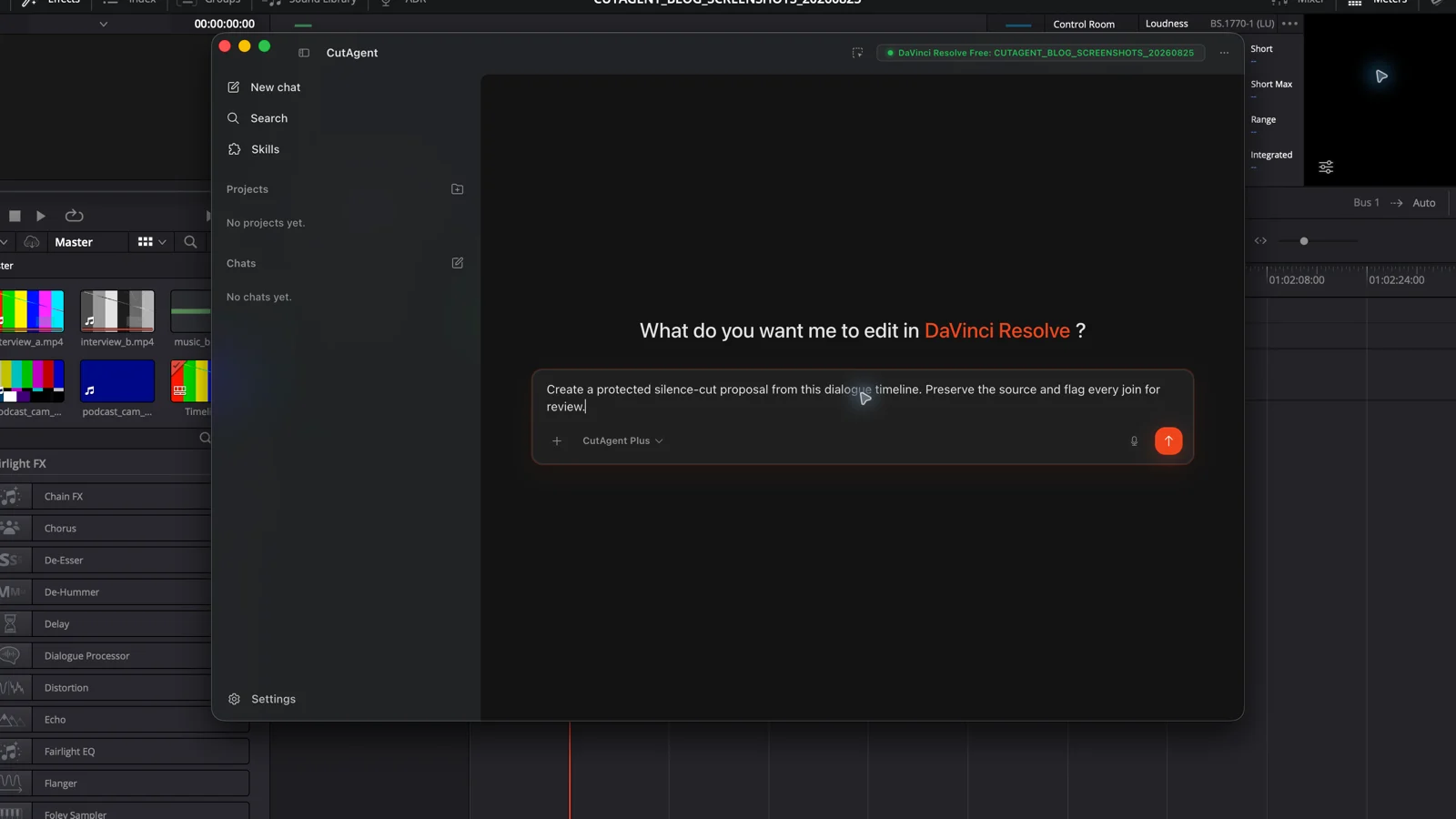
Inspect the current Interview master v12 timeline and make no changes until you confirm the active timeline and track layout. Create a new timeline named Interview silence review 01. Remove only pauses that meet the agreed threshold and minimum duration, keep padding around speech, and leave the source timeline untouched. Report the number of removed ranges and the new timeline name. I will review every join in DaVinci Resolve before approving the cut.
In the CutAgent workflow, the editor gives that brief in the desktop app. CutAgent uses its supported local editing layer to analyze the timeline audio and assemble the kept ranges into a new timeline. The editor then inspects the result in DaVinci Resolve. The separate timeline makes comparison possible; it does not make the proposed cuts correct.
This follows the same plan, execute, and review model used for safer DaVinci Resolve automation. Silence removal needs a stricter track brief because every accepted gap changes downstream timing.
Review the joins in four passes
Do not approve the result from its shorter duration or a clean waveform. Each pass catches a different class of damage.
| Pass | What to inspect | Typical correction |
|---|---|---|
| Speech | Clipped consonants, swallowed endings, interrupted breaths, and words below the threshold | Restore the range or add more padding |
| Rhythm | Questions without thinking time, jokes without a beat, and relentless jump-cut cadence | Keep selected pauses even when they qualify as silence |
| Picture | Head-position jumps, broken gestures, missing reactions, and cuts that need B-roll | Extend the join, restore the beat, or cover it deliberately |
| Timeline | Music, captions, graphics, markers, and secondary audio that moved or lost sync | Repair from the protected source and tighten the track scope |
Keep meaning-heavy pauses manual
Automatic detection is most useful on consistent single-speaker recordings with stable noise and obvious dead air. Keep the pass manual when silence carries performance, when speakers overlap, when the noise floor changes, or when connected tracks must preserve complex sync.
- A dramatic interview answer where the pause shows hesitation or emotion.
- Comedy, education, or product demonstrations where timing supports the point.
- Multicam conversations with reactions during another speaker's pause.
- Recordings with gates, music, air conditioning, or changing microphone distance.
- Timelines where captions, graphics, sound effects, or externally approved timecodes must remain fixed.
For a protected first pass, download CutAgent and name both the source and result timelines in the brief. Start conservative. The useful outcome is not the maximum number of deleted gaps; it is a reviewable timeline whose speech, rhythm, picture, and sync still hold together.
Sources and further reading
- DaVinci Resolve 20.2 New Features Guide - Blackmagic Design. Accessed August 25, 2026.
- DaVinci Resolve product and edition overview - Blackmagic Design. Accessed August 25, 2026.
- CutAgent product overview - CutAgent. Accessed August 25, 2026.